Showing posts with label statistics. Show all posts

Monday, 24 June 2013

Keeping up with the Tools of Your Trade

http://www.banner-advertisement.org/wp-content/uploads/2011/12/Social-Media-Tools3.jpg


Check out Social Media Success FaceBook Page https://www.facebook.com/MichaelBev50?  keep in touch & like the page while there! I will always reciprocate


Keeping up with the latest tools


Keeping yourself updated with all things Social Media can be tricky as new media apps/ideas/things become available almost every day. New strategies proliferate every hour and everyone thinks they hold the next big thing!  No wonder it can be scary. 
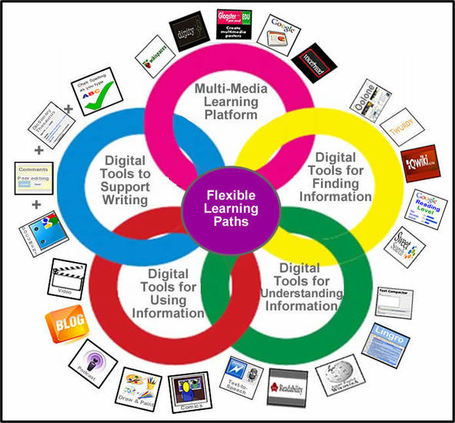
http://img.scoop.it/V2GdlTDe8WChKkTy0IC9XDl72eJkfbmt4t8yenImKBVaiQDB_Rd1H6kmuBWtceBJStaying current is about three different components: Keeping up with the newest developments, experimenting with digital tools, and learn as much as you can.


Keeping up with the latest tools is about finding tools that will curate information so that you can easily access and process it. You might be surprised, but this tool is the (relatively old) standby, RSS. RSS, or real simple syndication, was developed to deliver information from the web to people who subscribe to that information. For example, most blog sites are equipped with RSS feeds which allow a user to subscribe to the blog and have the blog material delivered in a variety of formats.

http://www.q8cosmetics.com.hk/eng/tools/digital_perm/images/wire_LG.jpg 
Use the RSS reader in Google Reader to manage your subscriptions so that you stay up to date with the most current research and trends in digital media. Though there's a catch. I find the process of logging to access the content to be a little clumsy on mobile devices. Two tools that make that simple. Reading blogs on the iPhone, the Feeddler app is a great resource for you to manage the blogs and podcasts that you plan to read or listen to. The app alerts you when there's new posts to read and you can quickly scan through the titles of the posts to see which ones capture your interest. Second, If you prefer to read posts in a more magazine-like style, especially on my iPad. In that case turn to Flipboard.  Flipboard takes the RSS information puts it into a visual display like a magazine that you can scroll through by turning pages and clicking on articles to read the most recent updates.

Both Flipboard and Feeddler use Google Reader as their source of information, so all of the material that you read on any of these three tools syncs with the others. Therefore, when you mark items that you’ve read in Feeddler, they are also marked as "read" inside Google Reader and Flipboard. I also find it valuable to be able to share an article using Feeddler or Flipboard through Twitter, email, or other vehicles that allow me to connect these articles to my followers, customers and colleagues.

Experimenting with digital tools

Try experimenting with all the tools out there! “the ones you think look interesting or can help your business” especially the FREE ones. And through experiment you will find tools out there that will help you and often become valuable time savers. Experimented with Facebook, Twitter, Foursquare, Pinterest, Storify, MindMeister, Goanimate, Audacity, and a variety of iPad and iPhone apps, to name a few. All will hold invaluable tools, which help and make your work much easier. 

 http://solvater.com/wp-content/uploads/2011/06/social-media-tools.png


Starting off


Most people start with the big three facebook, Twitter & Pinterest with LinkedIn being the professional users choice, which can reach millions of business people across the globe. I would recommend the three above to start off your business and experiment with the tools that they all offer, gain confidence with the sites and navigation systems they have, once you have accomplished these you can go on and add many more to your portfolio, which in turn widens your audience – all good. It can be mind blowing and there will be obstacles to overcome, but believe me it is worth persevering, just work through at your own pace otherwise you can overload! 

These strategies are my ways of keeping current with the changes in digital media technology and the way it affects my business. We are all learners no matter what age you are especially in this digital world of ours, I’d love to hear about the ways that you stay current – all comments welcome after all we all learn from each other. 

Happy tool hunting! 
Mike Beveridge

 https://www.facebook.com/MichaelBev50?  Check out Social Media Success FaceBook Page for more topical stories

  http://www.runic.com/print/wise-owl-logo.jpg

Tuesday, 28 May 2013

10 Signs You Are You Addicted To Social Media

Join the Revolution - addiction? 


https://www.facebook.com/MichaelBev50 keep in touch & like
the page while there!

Find me on LinkedIn http://www.linkedin.com/pub/michael-beveridge/23/309/b21

Follow #beveridge50 Or #beveridge53 for Interesting & Topical Tweets


Its addictive, informative and can be lots of fun Jeff Bullas should know? 


It was years ago and my children would spend hours either on MySpace or instant messaging and I wondered why they would want to spend so much time on the computer communicating on social 10 Symptons and Signs Of Social Media Obsession and Addictionmedia channels. Five years ago the term ‘Social Media Marketing” hadn't even been invented yet but now our obsession with social media has moved on to include business social media activities s well as personal use. So now we can justify the time spent on social media as a business activity just to salve our conscience.
To put a few activities into perspective let’s check in on our social media and digital activities for signs of  addiction and obsession by asking some pertinent questions.

Do you have following symptoms?

  1. When you leave your iPhone behind at home do you feel a sense of loss and isolation becasue you can’t check your Facebook or Twitter updates while out and about
  2. You check your Facebook account 20 times a day
  3. If you don’t receive a comment on your latest blog post within 12 hours you have suicidal thoughts
  4. You go away for a weekend without your laptop and your suffer severe heart palpitations?
  5. You have more social media icons on you iPhone than productivity apps?
  6. You stood in line for an Apple iPad for 24 hours just so you could update your Facebook on a bigger screen while on the move
  7. You have more online friends than you have in real life
  8. You Tweet on your mobile while walking
  9. You log on to Facebook before you have brushed your teeth in the morning
  10. You check your Facebook or Twitter updates ‘after’ going to bed
There are also some revealing  graphics from  Retrev0 who commissioned a study of 1,000 online individuals to provide an insight into our digital proclivities.
The first provides some comparison between 3 types of users, under 25′s, over 25′s and iPhone users on Twitter and Facebook check ins.

Do you check/update Twitter, Facebook first thing in the morning!

10 Symptons Of Social Media Obsession and Addiction

The other graphic on digital addiction that I found rather revealing was “Can you be interrupted for an online message anytime?” which provides some revealing inclinations.

10 Symptons and Signs Of Social Media Obsession and Addiction

On the question who is the most social media obsessed country in the world in terms of time spent on average per month, that dubious award belongs to the Australians with the UK second, Italy third, the USA  in fourth place and Spain holding down fifth spot.

10 signs you are addicted to social media

Graphic courtesy of Nielsen Online Social Media report 2010
So what is your social media obsessions that have your partner or friends considering booking you into a specialist social media addiction clinic?


http://tiny.cc/iswlww  = Interesting Stories & Topical Posts 


Friday, 24 May 2013

The Social Media Revolution


The Power Social Media Gives Your Business Should Not Be Underestimated  


https://www.facebook.com/MichaelBev50 keep in touch & like
the page while there! I will always reciprocate

Find me on LinkedIn http://www.linkedin.com/pub/michael-beveridge/23/309/b21

Follow #beveridge50 Or #beveridge53 for Interesting & Topical News and the Odd Joke! 


have been aware of the benefits of social media for a while now and have used this blog as a pulpit and soapbox to shout from this digital hilltop. I have personally experienced the power of this new media to accelerate brand awareness and to spread my stories.12 Major Benefits Of The Social Media Revolution
You can exhort and preach to the CEO’s and executives about social media’s power and some will “get it“, but until you start to experience it for yourself  the flame will not blaze brightly.

I look at my blog’ s Google analytics from time to time and the Global reach that you can achieve with social media never ceases to amaze me. I don’t know of any other media that could achieve that in less than 2 years without spending a cent in traditional advertising or marketing dollars.

The Harvard Business Review analytics Services recently conducted a survey of 2,100 organisations and discovered that 79% are currently using social media channels. They also asked them what they saw as the benefits of social media and here are the results and feedback from the real world.

The 12 Major Benefits Of Social Media
1. Increased awareness of the organisation
2. Increased traffic to website
3. Greater favorable perceptions of the brand
4. Able to monitor conversations about the organisation
5. Able to develop targeted marketing activities
6. Better understanding of customers perceptions of their brand
7. Improved insights about their target markets
8. Identification of positive and negative comments
9. Increase in new business
10. Identification of new product or service opportunities
11. Ability to measure the frequency of the discussion about the brand
12. Early warning of potential product or service issues

Note: Below are the graphical results of the Harvard Study
12 Major Benefits Of The Social Media Revolution
What often does scare the CEO is that as well as the benefits that social media does bring, there is a downside encapsulated in this comment by Paul Gillin the author of “The New Influencers”
Conventional marketing wisdom long held that a dissatisfied customer tells ten people. But…in the new age of social media, he or she has the tools to tell ten million.

The challenge is to not let the fear of this unknown overwhelm the benefits that the social media revolution can provide to an organisation.

What benefits have you experienced with  social media either for yourself or your company all comments welcome - below

https://www.facebook.com/MichaelBev50 check in for more news & helpful information 

http://www.jeffbullas.com/2011/02/14/12-major-benefits-of-the-social-media-revolution/

Monday, 22 April 2013

Check Out LinkedIn New Search Tool

Great Exposure - Comments Welcome 


The professional social network LinkedIn recently rolled out a number updates -- one being a revamp of its search tool.
The latest feature allows users to streamline search by providing results of people, companies, jobs, groups and other filters into one personalized result. People just need to type what they are looking for in the search box, and voila results galore. Prior to this move, users had to do separate searches for each filter, equating to a major headache.
As this new tool simplifies search for people, it can also help LinkedIn users increase their relevancy by appearing in various filters -- be it personal profiles or groups. That’s good news for young entrepreneurs looking to make key connections with more and more influencers, vendors and potential customers.
If you haven’t joined LinkedIn, now is the time. Check out these five tips for standing out on the social network:
1. Complete your profile.This should be a no brainer, yet I see incomplete profiles all the time. LinkedIn isn’t like Facebook. It’s for business, and your profile is a reflection of your professionalism, as well as your experience and expertise. Complete every section thoroughly, and make sure it’s written well. It takes time at first, but it pays off in the long run.
2. Share valuable content.LinkedIn is like any other social network. The better the content you share, the more engagement you will get. While providing updates pertaining to articles, job postings and career advice, can make you standout, don’t overdo it. Only share information that is relevant and useful to others. Also, don’t be self promotional. You want to share value added content, not ads for your own services.
3. Join the right groups.LinkedIn groups are a great way to meet people who you might not be connected to otherwise. Don’t only join groups associated with your industry and your local area, but also ones comprised of your target audience. While communicating in groups is a great way to network, don’t join for the wrong reason. You’re not looking to make sales in a group, but it’s great to connect with people who might buy from you at some point. An extra bonus? The more relevant groups you join, the more search results you will be featured in.
4. Be a resource.If the only time anyone hears from you is when you have something to sell them or a favor to ask, their view of you will sour fast. Reach out to people in an effort to help and connect on a genuine level. Introduce yourself through groups, and send personal messages with some thought put into them. If you see a question posted you can answer, do it.  When people see you as a resource, the benefits can be tremendous.
5. Optimize your profile for search.LinkedIn’s search algorithm is incredibly easy to manipulate. Note that I don’t recommend keyword stuffing your profile. Instead, I highly recommend legitimately optimizing your profile for the terms you want to be associated with. Make sure your primary expertise is displayed in your headline, your job function and within your job descriptions. You can see how many times your profile has come up in search, so track this before and after your optimization efforts. If needed, keep tweaking your profile to improve the numbers.
What else would you add for making the most of a LinkedIn profile? Please share in the comments.


Read more: http://www.youngentrepreneur.com/startingup/marketing-strategies/forget-facebooks-social-graph-linkedin-has-a-new-search-tool-too/#ixzz2R7n2YM9O

Sunday, 21 April 2013

Creating Viral Tweets for Your Business

Tweeter's Unite an Interesting Read - comments welcome


In his book Ultimate Guide to Twitter for Business, online marketing expert Ted Prodromou offers an easy-to-understand guide to using Twitter that will help small-business owners generate leads and connect with customers. In this edited excerpt, the author describes just how you can write Tweets that Twitter users will forward numerous times.
Everyone has forwarded a funny email or a link to a hilarious YouTube video to their friends. We also forward information we think is important or relevant. When content is forwarded numerous times, it's considered viral content. So what makes content viral, and better yet, how do we create viral content? Wouldn't you love to be able to create content that's forwarded over and over again?
Creating viral content isn't as hard as you think. Here are some ideas to help you create viral content.
Add a call to action. 
Every Tweet should be done for a specific reason and should include a call to action. Every time you Tweet, you want your followers to ReTweet it so it spreads throughout the Twitterverse. This enables your message to reach more people than just your followers. When someone ReTweets your Tweet, it's seen by your followers and the followers of the person who ReTweeted it. Every time your message is ReTweeted, it expands into another network of Twitter users, accelerating faster and faster each time.
You know the old saying, "Ask and you shall receive"? Ask people to ReTweet your Tweet, and they will most of the time. When you have a message you really want people to ReTweet, just add, "Please RT" or "Please ReTweet" to your Tweet. This works amazingly well if you don't overuse it.

Related: 14 Steps to Generating Leads on Twitter
Some other words you can use in your Tweet that will encourage ReTweeting are:
  • Check this out . . .
  • You should really follow . . .
  • Please vote
  • What do you think of . . . or Where is the best place to . . .
  • I need some help . . .
Timing. 
You need to experiment to see when you'll get the best response from your followers. From my experience, a business-related Tweet receives the most traction on weekdays during working hours, which makes perfect sense. When you get a ReTweet, track it in a spreadsheet and note the day, time, and content of your Tweet. This will let you see patterns and determine the best time to Tweet to your followers.
You can also use SocialBro to determine the best time to Tweet. In the Tools section of SocialBro, choose "Best Time to Tweet," and the program will assess your followers' behavior and tell you what time they're likely to be online and Tweeting.
Links. 
According to Dan Zarrella of HubSpot, Tweets with links in them are ReTweeted almost 70 percent of the time.
Social proof. 
When you see a great movie, what do you do? I bet you tell your friends about it. Then your friends go see it and tell their friends about it. Word spreads faster and faster as each friend tells their network of friends. The momentum turns into frenzy, and suddenly the movie turns into a blockbuster.
This is called "social proof," also known as "social influence." We tend to think if something is OK for one person, then it's OK for us because we assume they have more knowledge about the subject.
Because of the social proof phenomenon, the likelihood of a Tweet being ReTweeted increases dramatically each time it's ReTweeted. The momentum builds with each ReTweet, and suddenly you have a blockbuster Tweet.

Related: Using Twitter for Sales and Marketing
Add value.
You build your reputation on social media by providing value to your network. The adage "The more you give the more you receive" holds true in social media. Follow some big names on Twitter like @CarrieWilkerson@ChrisBrogan and @BrianSolis, and see how they add value to their networks. They give way more than they receive. You never see them dominating a conversation on Twitter or speaking negatively about a person. They are constantly providing great resources and product reviews to their followers. Notice how many ReTweets they receive after they Tweet a good resource or their opinion on a topic. Their Tweets are always ReTweeted hundreds of times by others.
Take note of what the successful Twitter users Tweet about that gets ReTweeted. Follow their lead and use the same Twitter style they do. Here are some ideas about what you can Tweet about that will receive a lot of ReTweets:
  • How-to information and instructional content
  • Breaking news
  • Tech warnings such as viruses, Facebook scams, or product updates
  • Contests and discount coupons for products or services you enjoy
It's not hard to create viral Tweets when you think from the perspective of giving instead of receiving. Provide valuable information and support to your followers, and your Tweets will be ReTweeted with regularity.

Related: Using Twitter's Promoted Services
Read more: